Audiopod
Using the audiopod accessory, you can record and play back analogue or digital audio (or use the provided microphones), timestamped using the same clock as the sniffer uses to timestamp the Bluetooth packets on-air. This is particularly useful for measuring conformance with the Presentation Delay requirements of LE Audio, and can also be used to measure timing, quality, and the effects of missed or retransmitted packets on all types of Bluetooth audio streams.
Capturing and playing audio
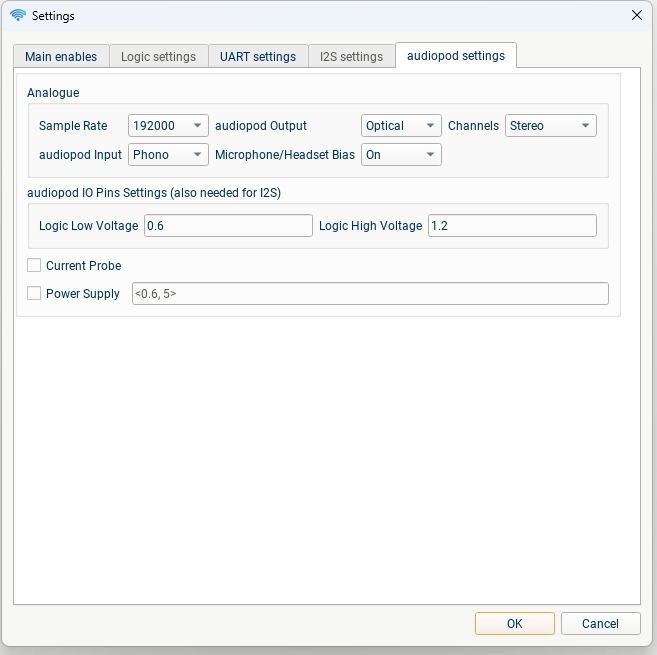
To capture traffic using audiopod: connect the audiopod to the Moreph, use the USB-C port on the audiopod to provide power, and connect audio cables to whichever of the ports you want to use.
To configure the audiopod, in the "Main Enables" tab select the audiopod checkbox.
Then in the "audiopod settings" tab you can configure the audio inputs and outputs to audiopod; either logic levels for input or output of e.g. I2S on the logic pins, or one or more of the audio connectors: Phono, 3.5 mm Jack, Coax S/PDIF, Optical S/PDIF, or the combined input+output "Headset" connector. When using the external ear-canal microphones, or other microphones which require a bias voltage, make sure to configure the "Microphone/Headset Bias".
Settings (other than volume controls, and enables for the AGC and DRC on input/output) must be selected before starting the capture.
For audio output, you can either provide a file for blueSPY to play (.wav or .mp3), or use the simple tone/chirp generating options in the audiopod tab. NB: A constant tone or other short-period periodic signal will not work for measuring audio latency/synchronisation! White noise is a good choice.
The second part of the "audiopod settings" tab allows configuration of the voltage thresholds for using audiopod to capture logic signals, and configuration of the optional current measurement probe.
Analysing Latency
Audiopod introduces two new tabs to blueSPY, the "audiopod" control tab and the "audiopod Plots" tab displaying graphs of correlation and audio spectrum. In the top half of the "audiopod" tab are the volume/gain controls, and controls over the signal generation or file choice for the audio output. In the bottom half of the tab, you can choose which Bluetooth audio streams you want to correlate with the analogue/digital audio inputs and outputs. Below these controls, you will see a table containing either latency/synchronisation measurements, or "N/A" if no correlation was found between the signals you are comparing.
To trigger a measurement, choose a time to measure at (the calculation uses one second of audio centred at this point) by clicking on a packet, e.g. in the Timeline. While capturing you can also use "Autoscroll" in the Timeline; this will cause the calculations to continuously update using the most recent second of audio.
The "Audio" tab shows two types of graph; how many graphs are shown depends on what signals you have chosen to measure.
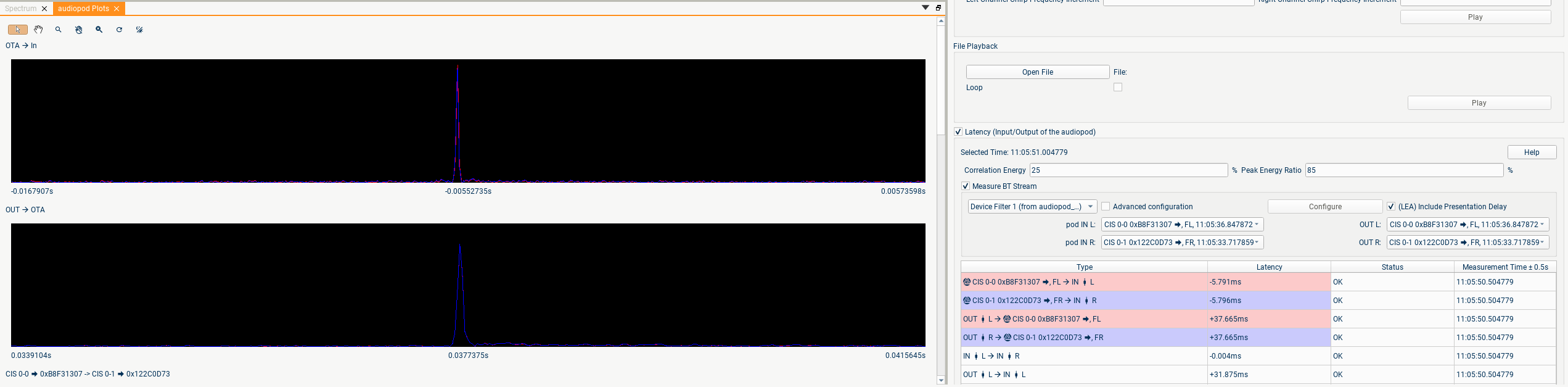
The first type of graph shows the output of a cross-correlation of two of the audio signals. If the two audio streams contain the same signal but one is delayed, you should see a sharp single peak whose x-axis position represents the time-delay:
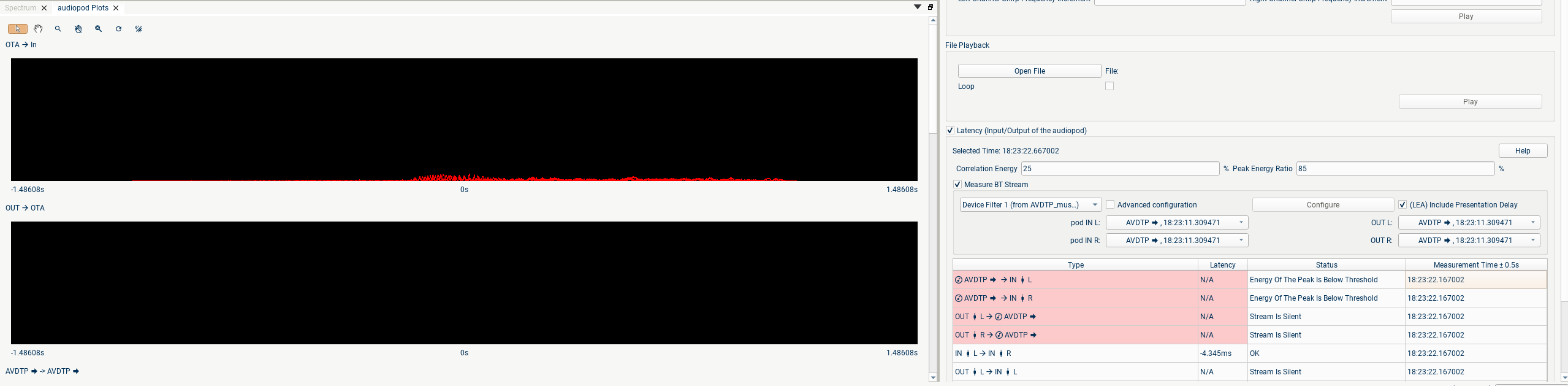
If the signals are unrelated you will see no graph, or just noise:
If instead of one peak you see a number of peaks, this is likely to indicate that the audio signal you are using is too similar to a periodic signal, e.g. a single musical note:
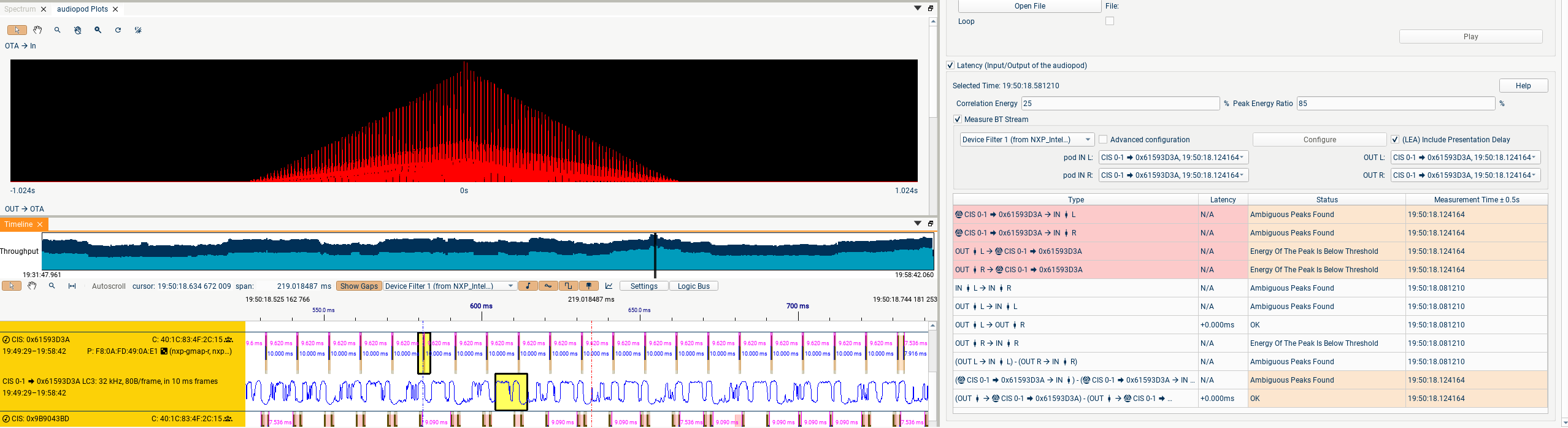
Ideally you should change the audio input to something with a wider bandwidth. If this isn't possible, you may still be able to get a latency measurement, but you may need to reduce either/both of the thresholds in the audiopod tab to lower the criteria for what is considered a valid correlation.
NB: You don't need to try to read time values from the graph! The position of the highest peak (if it meets the specified thresholds) will be reported in the table of latencies.
The second type of graph displays the spectra of the audio signals at the audio input and output. Currently this is purely an indication of what audio is currently being heard; in a subsequent update we will measure the difference between the input and output spectra to measure the frequency response of the channel.
Using audiopod to measure LE Audio latency
The example capture "audiopod_LE_Audio_CIG.pcapng" provides an example of using audiopod to measure all of the relevant subsections of latency of an LE Audio stream. The physical setup in this capture was:
-
Audio was played by audiopod into the input headphone jack of a development board.
-
The development board transmitted this audio over two CISes (left and right) to two other development boards.
-
The headphone jack outputs from these boards were combined and sent into the stereo jack input of audiopod.
Audiopod provides accurate timestamps for the audio at points (1) and (3), and the Moreph provides accurate timestamps for the on-air packets of (2). Using these timestamps and the detected CIS and audio parameters, we are able to calculate the "SDU Synchronization Reference" as detailed in this diagram from the TMAP test specification:
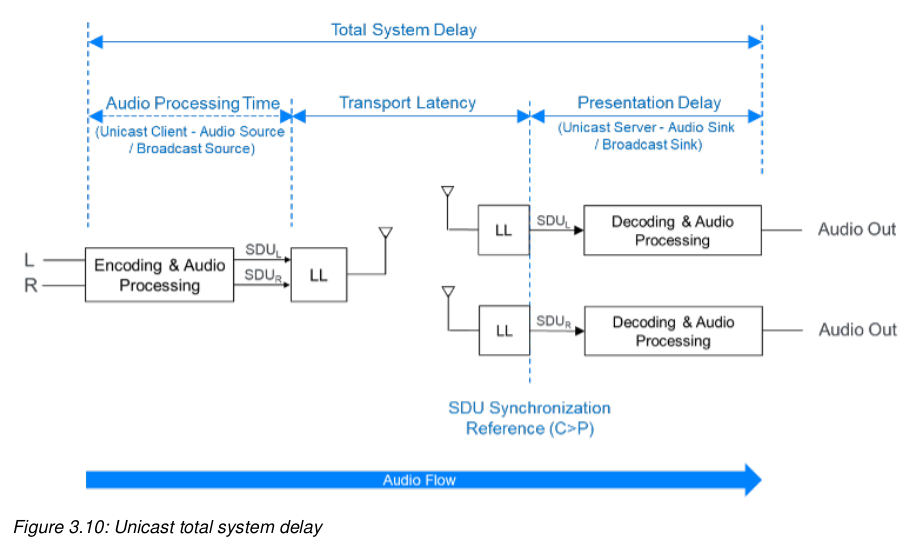
If you select a baseband packet and go to the Details pane, you will find the SDU Synchronisation Reference for that packet, along with some of the other timing references related to the packet and the CIS Event.
To select a Bluetooth stream to compare with the audiopod input/output:
-
First of all, ensure that the relevant devices are selected in the Device Filter
-
Click on a suitable time in the Timeline, when the audio is playing.
-
The audio-streams involving the filtered devices which are playing at that time-point will now be available to select in the circled dropdowns.
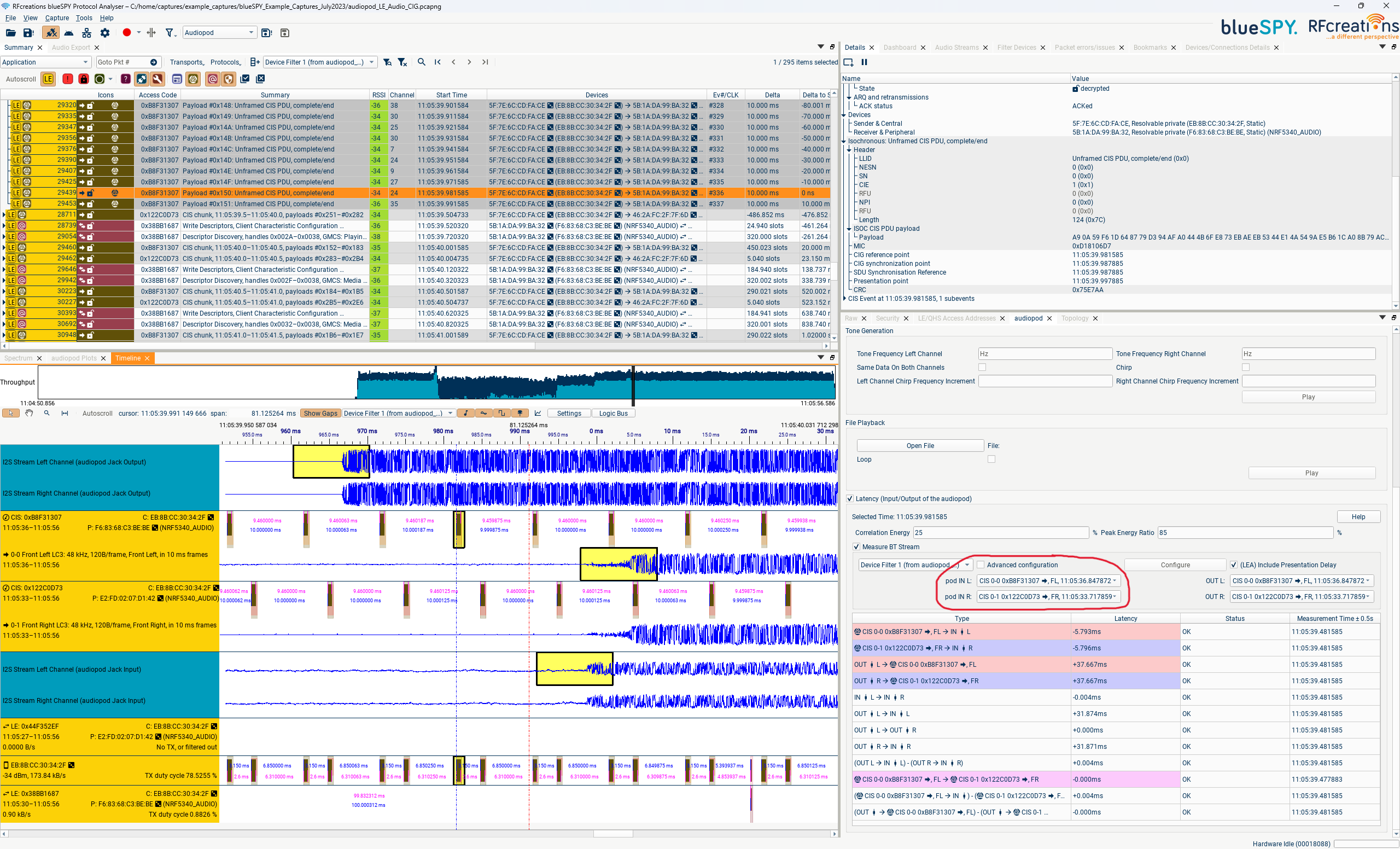
The four rows of audio displayed here correspond to the three points in the audio chain mentioned above. The first row is the stereo output from audiopod, point (1). The next two rows are the two CISes (left and right), point (2). The final row is the output from the two development boards, returned to the stereo input of audiopod, point (3).
The yellow highlighted regions represent the same 10 ms frame of audio, at the different points:
-
The 10ms of audio played into the development board starting at 11:05:39.960218 is captured by the Central development board
-
The left channel of this audio is encoded using LC3 and transmitted in packet #29439, sent at 11:05:39.981585. Using the CIS Offset, CIG & CIS Sync Delays, Presentation Delay and other CIS parameters, it's possible to calculate the correct start time or "Presentation Point" for the frame of audio: 11:05:39.997885. This Presentation Point is the start of the yellow highlighted region on the second row.
-
The audio from packet #29439 is decoded by the development board and played out of its headphone jack starting at 11:05:39.992092, i.e. 5.793 ms early. This is displayed in the table of latencies as "Presentation Point → audiopod L channel input Sync : -5.793 ms" instead of the ideal value of 0.000 ms
So although the total latency from audiopod output to audiopod input is a commendable 31.874 ms, this has unfortunately been achieved via a miscalculation of the correct presentation delay to apply.
On the most important measure, the Left-Right Sync, this implementation has done rather better. The audio played out of audiopod here is identical on the two channels, and so can be directly compared in the OTA packet and at the analogue output; the synchronisation here is almost perfect.
This example showed a setup where cabled audio input and output were possible; this allows measuring the end-to-end latency, and all of the sub-components of the latency defined in the TMAP and GMAP specifications (e.g. the audio input → SDU sync reference timing is tested for Peripheral → Central "uplink" audio).
When cabled audio is not available, the microphones can be used to record a DUT's speaker's output (e.g. by placing the earbuds you are testing into the ear-canal microphones), and wired earbuds or other speakers plugged into audiopod's outputs can be used to play into a DUT's microphone.
When audio input to the system is not available (e.g. when testing using a smartphone or laptop as the Central), the second portion of the system (SDU Sync Reference → audio output) can still be measured, provided a reasonable source of audio (music with a reasonably wide bandwidth) is available on the device.
Using audiopod to measure A2DP, HFP, ASHA, and Apple MFI latency
In the Bluetooth audio specifications prior to LE Audio:
-
the correct time to render the audio is not defined;
-
the transport packets are not always sent at fixed intervals;
and so the calculations carried out by blueSPY are a little different. Instead of showing the discrepancy between a frame of audio's "Presentation Point" and the time at which it was rendered, we show the time interval between a packet containing audio (e.g. an AVDTP packet) and the time it is rendered by the receiver. As in this case the transport isn't synchronous, we show the mean, minimum, and maximum value of this time interval within the 1 second of audio used.