Decrypting
Most Bluetooth communication is encrypted, and a key is required to decrypt it. In blueSPY this is handled through the Security tab, which stores a persistent database of keys.

The supported key types are BR/EDR link keys, LE LTKs, ECDSA pairing keys, Broadcast Codes or Broadcast GLTKs, Encrypted Advertising keys, EKS traffic secrets, and EKS Session Key + IV. You can add or import keys, and delete, edit or export the currently selected keys using the buttons on the right.
Adding or editing a key will show the following dialog:
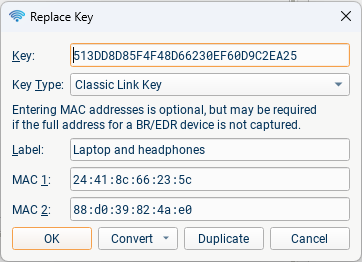
You only need to enter the key, the key type can be automatically detected and in most cases the MAC addresses can too. The label is also optional, but helps keep track of the keys. The 'Convert' menu allows you to easily perform some byte reordering operations on keys. When editing a key, you can press Duplicate to add a new similar key instead of replacing the old one.
After adding a key, press "Reload" to re-parse the current file using the new key. If a key is successfully used to decrypt some traffic, it will be highlighted in green in the Security table, and the number above the reload button will show the number of successful keys. Any successful keys will be stored in the file when the capture is saved.
Since there is often confusion about the endianness of keys, the software will try both the key as entered and the byte reversed version, and correct the key if it was entered reversed.
If a key is seen in an HCI, ATT or SMP message it will automatically be added and used.
Devices using LE Legacy Pairing are insecure, and the packets are decrypted without the need to add any keys as long as the pairing has been captured.
Link Keys
Link keys for BR/EDR or LE are entered as 16 hexadecimal bytes (32 characters), byte 0 first. The fields for adding MAC addresses do not need to be filled in usually, however if either of the full addresses for a BR/EDR device were not found during a capture you will need to add them manually. The addresses will be automatically filled in once a successful decryption has occurred.
ECDSA Pairing Keys
These are entered as a 24 or 32 byte (for P-192 and P-256 respectively) hexadecimal big endian integer. The corresponding public key is shown when the full key is entered and the appropriate type is selected so you can verify it has been entered correctly.
Broadcast Codes
You can enter broadcast codes as 16 hexadecimal bytes like the other keys, or you can enter the code string directly if you select the 'Broadcast Code' key type. The first character of the code is the last byte of the hexadecimal version, as defined in the Bluetooth specification. You can convert between the code string and hexadecimal form using the convert menu.
Encrypted Advertising
Encrypted Advertising keys are entered as 24 hexadecimal bytes, a 16 byte key followed by an 8 byte IV.
Encryption Key Schedule (EKS)
For EKS, there are several possible sets of keys which can be entered:
-
LTK and the ECDH private key (from either side of the connection)
-
The ACL traffic secret or CIS "derived secret"
-
The Session key and IV for a particular ACL or CIS. Enter 24 hexadecimal bytes, a 16 byte Session Key followed by an 8 byte IV.
Any one of these sets is sufficient to decrypt a particular EKS connection or EKS CIS; options 1 or 2 allow decrypting a sequence of connections or a sequence of CISes without needing to enter a new key each time.