Changing Layouts
In blueSPY, the arrangement of tabs along with the configurations of each tab is called a Layout. Layouts can be saved to and loaded from blueSPY at the user's convenience, and there is a selection of built-in layouts within blueSPY to choose from.
Each tab has information about it stored in a layout such as which buttons are pressed and their geometric dimensions. For example, in a Summary tab, the columns used, the filtering options, and any search queries are stored.

-
Drop menu to select different layouts.
-
Saves the current layout as a new layout.
-
Overwrites the selected layout with the current layout; only possible for user-defined layouts.
Two user-defined layouts cannot share the same name, and a user-defined layout cannot share a name with a built-in layout. BlueSPY does not load the state of the application layout from when it was last closed. BlueSPY will load the most recently selected layout before it last closed. The user must remember to save their layout regularly if they want it to persist after closing the application.
A layout can be exported to a file, e.g. for transferring to another computer.
Built-in Layouts
BlueSPY contains eight built-in layouts:
-
Standard — A general-use layout for larger screens.
-
Compact — A general-use layout for medium-sized screens.
-
Minimal — A general-use layout for small screens.
-
Audiopod — The Audio and Audiopod tabs raised.
-
Audiopod Large — The Audio, Audiopod, and Audio Export are raised.
-
Channel Sounding — Channel Sounding options are selected, and two Details tabs are present to make it easy to compare different CS procedures/events/steps.
-
HDT — Two Summary tabs are configured, one showing HDT Payloads and one showing HDT Packets.
-
LE Audio — Two Summary tabs are configured, one showing configuration traffic and one showing audio packets.
-
Low Level — Focuses on baseband packets and their timing.
View Menu
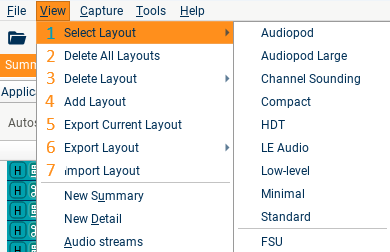
-
Select a built-in or user-defined layout.
-
Deletes all user-defined layouts.
-
Deletes a single user-defined layout.
-
Saves the current layout.
-
Exports the current layout to a file.
-
Exports a built-in or user-defined layout to a file.
-
Imports a layout from a file.