Importing GATT and HCI
If you have information to add to the air packets captured by the sniffer, they can be imported into the air-trace and displayed integrated with the Bluetooth traffic. You can use the injection interface described here, or you can import complete files. When importing files, currently we only support import of GATT, and HCI from btsnoop logs, but various other formats/methods of import are planned. If there is a format you would particularly appreciate, let us know and we can prioritise it.
Btsnoop import/merge
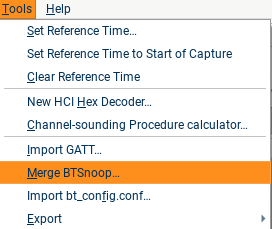
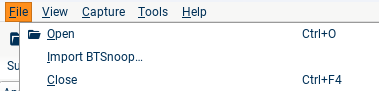
The btsnoop file format (with slight variations) is used by (at least) Android and blueZ for logging HCI traffic. If you have files in this format, they can either be imported (creating a new capture file) or merged into an existing file, including ongoing captures. NB: When you merge into a live capture, the files will be merged and the resulting files reloaded from scratch. No packets will be missed, but the resulting reload may take some time for large captures; you can watch the progress using the orange bar in the bottom right corner.
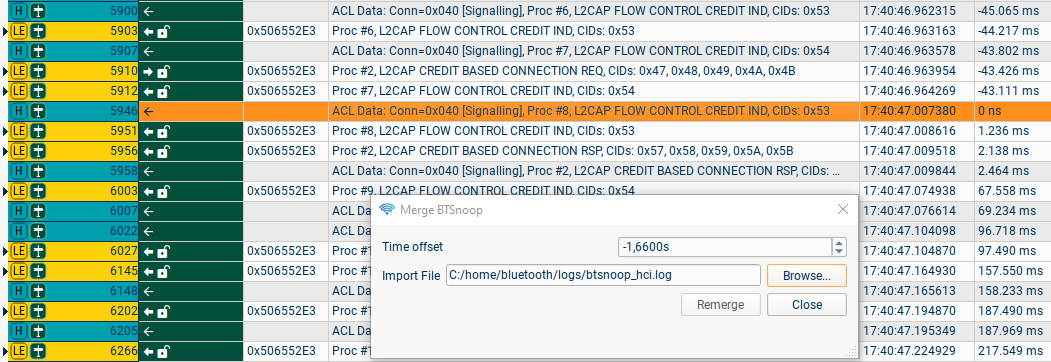 There is usually some timing offset between the clock used for the on-air capture (derived from your laptop's clock) and the clock of the Android phone. To get a rough time-alignment, find some packets which are present in both the air-trace and the HCI log (L2CAP Control packets are a good choice as they have a clear procedure number), eyeball the difference between the streams, and input the time difference before using "Remerge".
GATT Import/export
In LE connections, missing GATT attribute definitions can make it very hard to understand the traffic you capture, and in particular can prevent decode of LE Audio in some cases. Attribute definitions may be missing because of a few corrupted packets, or may be entirely missing if the capture contains a reconnection of paired devices which are using GATT caching. We attempt to cache on your computer any GATT traffic that we see and use it in subsequent captures, but this will fail if:
(a) the initial pairing was not captured using blueSPY and the same computer
(b) the devices do not read the Database Hash attribute, or the read is in a CRC-fail packet or otherwise corrupted.
We currently support three methods of fixing this problem, detailed below. After adding GATT definitions using any of these methods, the Summary strings and any new Details trees will be updated immediately; but to reanalyse a CIG and decode audio using the new information, you will need to press reload in the Security tab.
Manual correction
Individual attributes with a missing definition can be edited by clicking on a relevant packet and right-clicking on the attribute in the Details tree, and then setting the UUID (16-bit, 32-bit or 128-bit). This is probably most useful for adding a missing ASE Control Point definition; fixing this gives most of the information required for decoding LE Audio.
Android GATT database import
If one of your DUTs is an Android phone which you have root access to, you can copy the files from /data/misc/Bluetooth (adb pull /data/misc/bluetooth) and import the gatt_hash_* files you find there (File → Import GATT...)
blueSPY GATT import and export
If the initial pairing was captured in blueSPY on another laptop, you can open the relevant capture, export the GATT database information (File → Export → Export GATT), and then import the file to add missing GATT to a subsequent capture. These files use a simple JSON format detailing the attribute handles and the matching UUIDs, so if you are able to generate these files from your build system or fix missing attributes in an exported file then blueSPY can import this information.